Relive early Chrome visuals with a retro-themed extension
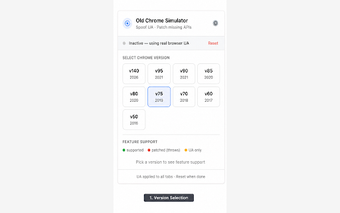
Old Chrome Simulator, created by independent creators, recreates early Chrome aesthetics for desktop browsing as a visual nostalgia tool. The extension applies selectable period themes and classic-style artwork across the browser surface to evoke the trapezoid-tab era, offering toggles that change the interface appearance. It targets long-time web users and UI/UX enthusiasts who want a historical browser look embedded in modern browsing workflows and visual research.
What the extension actually changes and where it stops
The extension implements its effect by replacing the New Tab Page and injecting retro-themed styles into the web-content area, producing a recognizable vintage atmosphere. It cannot replace the outer window chrome or the native address bar because modern browser security blocks such modifications, so the simulated look is confined to the page area and custom New Tab implementation rather than altering the browser's native frame.
How much memory and CPU overhead it adds during normal use
The add-on runs as a standard browser extension and is described as lightweight, so users should see a negligible change to browsing responsiveness. Theme application happens client-side and does not re-render site logic, and the extension can be enabled or disabled from the extensions menu without restarting the browser, which limits any transient resource use to periods when the visual skin is active.
Privacy impact and site compatibility to expect
The tool focuses on cosmetic styling and maintains compatibility with contemporary web standards, so pages continue to render and behave normally. It does not reroute traffic or act as a proxy, and its scope is limited to client-side styling rather than modifying network behavior or site data collection. That design keeps the extension from changing how visited sites collect telemetry or how the browser communicates with servers.
Who benefits and where it runs
The developer positions this as a niche utility for nostalgia, design comparison, and classroom demonstrations; the project has attracted positive reactions from a small, detail-oriented community. The extension supports Chromium-based desktop browsers on Windows, macOS, and Linux, and it does not run on mobile Chrome because that platform does not support extensions. Typical use cases include:
- Capturing period-accurate browser screenshots
- Comparing UI evolution for design studies
- Creating a nostalgic, high-contrast browsing session
A focused, low-risk visual tool for nostalgia and study
This simulator is a specialist add-on that serves readers and designers interested in browser history rather than users seeking functional browser changes. Its faithful visual snapshot provides historical context while leaving browsing mechanics intact, so it fits well as a desktop novelty or teaching aid. Try it in a secondary profile if you prefer to keep a clean primary browsing setup separate from stylistic experiments.